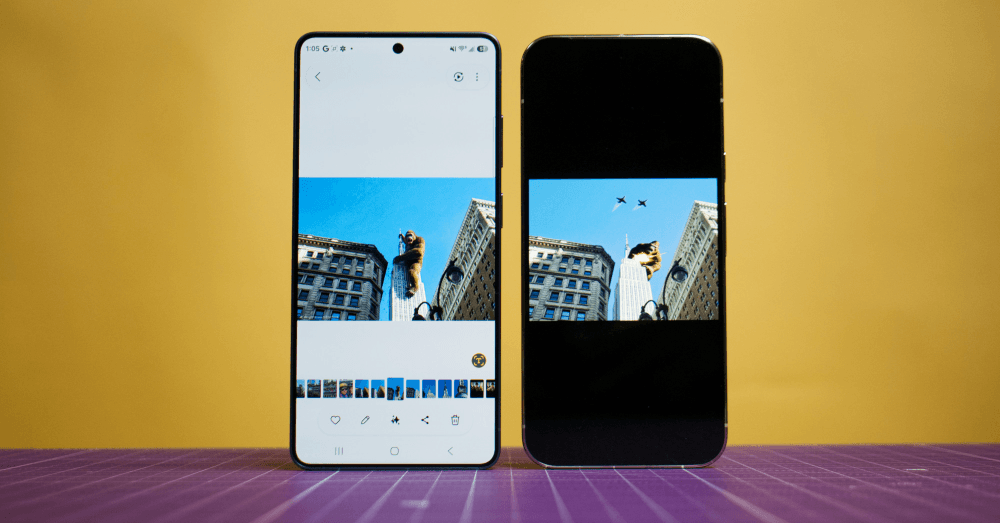

Samsung’s latest Galaxy S26 smartphone lineup brings a completely overhauled Photo Assist feature that lets you edit your images by typing plain-English descriptions. The tool can change backgrounds, restore missing elements, and shift a daytime scene to nighttime, all with a few tapped-out words. But for all its fun creative uses, the feature is raising real questions about where the line sits between photo editing and photo fabrication.
- For the first time, Samsung’s Photo Assist gains multimodal support through text prompts, letting Galaxy S26 users simply type a description to instruct the AI how they want a photo edited.
- A hands-on review from The Verge found stronger guardrails blocking violent or sexual content but noted inconsistent, glossy results and occasional image degradation.
- The majority of Galaxy phone users rarely use Photo Assist, with 74% saying they don’t, though Samsung’s upgrades could change that.
What Photo Assist Actually Does Now
Photo Assist now supports natural language editing, allowing you to make edits by simply saying what you want to change, without technical terms, specialized tools, or editing know-how. Think of it like texting your phone and asking it to fix your picture.
The flagship feature lets users edit images through conversational prompts. In Samsung’s San Francisco demo, typing “Make it look uneaten” restored a partially eaten cake to its original form. Users can also transform daytime harbor shots into sunset or nighttime scenes by simply asking the AI to adjust lighting and sky conditions.
The original Photo Assist tool allowed users to erase elements from photos and fill in cropped or missing areas through generative AI, but compared to the Galaxy S26’s upgraded version, the original looks a little bit toy-like. The new Samsung Galaxy S26 AI Photo Assist slop conversation doesn’t really capture how practical some of these edits can be for everyday users.
Photo Assist remembers your edits, keeping a history where every AI-generated change can be reviewed step by step, adjusted, or undone at any time. That undo feature is genuinely useful, especially if you’re experimenting and don’t want to lose your original shot.
Why Critics Are Pushing Back
The problem? The Galaxy S26’s updated Photo Assist lets users generate false content in their personal photos through natural language prompts, following Google’s controversial path with Pixel 9. You can fabricate scenes that never happened, add yourself to places you’ve never been, and tweak reality with disturbingly little effort.
The feature’s most striking example shows someone appearing to attend a concert at the iconic Las Vegas Sphere, with “Backstreet Boys” misspelled as “BACKSST BOYS” in what appears to be an AI hallucination. It’s a small detail that reveals a bigger problem: these tools can fabricate entire experiences with enough visual fidelity to fool casual viewers, but they’re still prone to telltale errors that expose their synthetic nature.
A Verge hands-on review noted inconsistent, glossy results and occasional image degradation, concluding the update makes casual creative edits easy but does not reliably produce photo-realistic manipulations. So the tech works, but it has a visual “tell” that savvy viewers can pick up on.
Samsung adds a visible watermark on the image output upon saving to indicate that the image is generated by AI. That’s a welcome safeguard, though it remains to be seen how easy it would be to crop or remove that watermark after the fact.
Google Walked So Samsung Could Run
The capability builds directly on Google’s Pixel 9 AI editing tools. Google started cautiously with its Photos AI features, initially limiting changes to background elements like making skies more blue or removing tourist crowds. But things got weird fast once natural language requests entered the picture.
Samsung has been clear that AI is a major selling point as smartphone hardware improvements plateau. You can’t dramatically improve camera sensors or battery life year over year, so software intelligence becomes the battleground. That explains the push. Samsung needs something to sell each new phone generation, and AI editing is one of the few features that can actually get people excited enough to upgrade.
The Photo Assist and Creative Studio features ship as part of the standard Galaxy S26 Ultra package, available to all users without subscription fees. This upgraded generative AI tool debuts with the Galaxy S26 series running One UI 8.5 and should reach other devices once the update exits beta and starts spreading over-the-air.
Should You Be Worried About Fake Photos on Your Phone?
There’s a real tension here. For over a century, photos served as trusted records of lived experiences. Sure, Photoshop made professional manipulation possible, but it required skill and effort. Now Samsung is putting that power in everyone’s pocket with a simple text prompt.
Consumer advocates and tech ethicists have raised alarms, but the industry shows no signs of pumping the brakes. If anything, the trend is accelerating, and Apple is widely expected to introduce similar features in upcoming iOS updates, not wanting to cede ground to Android rivals.
For now, the glossy, slightly off look of AI-edited images is a built-in warning label. You can usually spot them. But that won’t last forever. As the models get better, the edits will get harder to detect, and that’s when trust in personal photography could really take a hit. Whether you use Photo Assist for harmless fun or ignore it completely, it’s a tool that’s going to be part of every new Samsung phone going forward. The genie isn’t going back in the bottle.